

INTRODUCTION
AutoCAD for Beginners.
If you’ve ever wanted to create technical drawings for buildings, roads, or engineering projects, AutoCAD for Beginners is the perfect place to start. AutoCAD ranks among the world’s most widely used Computer-Aided Design (CAD) software applications. Architects, engineers, surveyors, construction professionals, and manufacturers rely on it every day to create accurate technical drawings and 3D models.
Learning professional design software may seem intimidating at first, especially if you’ve never used CAD software before. However, you can master AutoCAD by taking one step at a time. Practice regularly, follow the right learning resources, and you’ll quickly build the confidence to create professional-quality drawings.
In this guide, you’ll learn what AutoCAD is, why every beginner should consider learning it, the essential tools and commands you need to know, and practical tips that will help you start your AutoCAD journey with confidence.
WHAT IS AutoCAD?
AutoCAD is a Computer-Aided Design (CAD) software developed by Autodesk. Instead of creating drawings manually on paper, AutoCAD enables users to produce accurate digital drawings and technical designs using a computer.
The software supports both 2D drafting and 3D modelling, making it suitable for a wide range of design and engineering applications. AutoCAD is a computer-aided design (CAD) software developed by Autodesk.
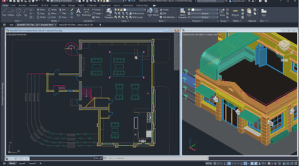 It allows users to create 2D drawings and 3D models with precision and efficiency. Professionals across industries from architecture and civil engineering to mechanical design use AutoCAD for drafting blueprints, technical plans, and digital prototypes.
Why Choose AutoCAD as a Beginner?
- User-friendly interface: Once you get familiar with the ribbon, toolbars, and commands, AutoCAD becomes intuitive.
- Versatility: You can design everything from floor plans to machine parts.
- Industry demand: AutoCAD skills are highly valued across multiple industries.
- Accuracy: The software enables measurements down to the smallest units, ensuring high-quality work.
Essential AutoCAD Tools Every Beginner Should Know
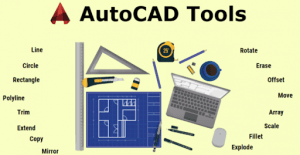
As a beginner, you don’t need to learn every command immediately. Start with the most commonly used tools:
- Line – Draw straight lines.
- Circle – Create circles of different sizes.
- Rectangle – Draw rectangles and squares.
- Move – Reposition objects.
- Copy – Duplicate drawings.
- Trim – Remove unwanted parts of a drawing.
- Offset – Create parallel lines.
- Dimension – Add measurements to your drawings.
Mastering these basic commands will make learning advanced features much easier.
Tips for Learning AutoCAD Faster

Here are a few practical tips to help you improve:
- Practice regularly, even if it’s just 30 minutes a day.
- Start with simple drawings before attempting complex projects.
- Learn common keyboard shortcuts to speed up your workflow.
- Use layers to keep your drawings organised.
- Follow tutorials and recreate the examples yourself.
The more you practice, the more confident you’ll become.
Conclusion
Every AutoCAD expert started as a beginner. However, success doesn’t happen overnight. Instead, it comes through consistent practice, the right guidance, and a genuine willingness to learn. As you progress, you’ll develop the skills and confidence to create accurate technical drawings and professional designs for real-world projects.
At Geoinfoacademy, we help learners build practical AutoCAD skills through easy-to-follow lessons, hands-on projects, and industry-focused training. Whether you’re taking your first steps with AutoCAD or strengthening your existing skills, our experienced instructors provide the knowledge and support you need. Moreover, you’ll gain practical experience that prepares you for academic, professional, and engineering projects. Throughout your learning journey, Geoinfoacademy will equip you with the tools and confidence to succeed.